Return of Moo.Ajax
Happy New Year!
So I'm sitting in my office, listening to XM radio (Frank's Place), sipping Dr. Pepper with my litecube, thinking about 2006. The end of a great year and my college education (just graduated from A&M with a computer science degree and a minor in business) has finally come and I'm trying to figure out how to start this new life.
¤º°`°º¤ø,¸¸,ø¤º°`°º¤ø¤º°`°º¤ø,¸¸,ø¤º°`°º¤øø¤º°`°º¤
2007
¤º°`°º¤ø,¸¸,ø¤º°`°º¤ø¤º°`°º¤ø,¸¸,ø¤º°`°º¤øø¤º°`°º¤
So I decided to commence the new year by adding a new post for the new moo.ajax (incidentally, on the new blogger).
Let's Begin

First thing you need to do is download the new moo.fx set. The MIT group, Mad4Milk, has released a new API called "Moo.Tools".
So, in the past moo.fx used prototype as it's base or backbone. All the effects were built on top of the prototype libraries. Mad4Milk decided to built their own base library, and they called it moo.tools.
For this tutorial, I'll be using moo.tools (I have a tutorial that uses prototype. If there is a large request, I'll redo it with the prototype version).
So download moo.tools.
I would like to take a second and talk about how awesome this page is. When you download your custom-made moo.tools, you choose what you want and the script automatically adds the dependent files! That's just amazing. I was blown away.

So, in the past moo.fx used prototype as it's base or backbone. All the effects were built on top of the prototype libraries. Mad4Milk decided to built their own base library, and they called it moo.tools.
For this tutorial, I'll be using moo.tools (I have a tutorial that uses prototype. If there is a large request, I'll redo it with the prototype version).
So download moo.tools.
I would like to take a second and talk about how awesome this page is. When you download your custom-made moo.tools, you choose what you want and the script automatically adds the dependent files! That's just amazing. I was blown away.

So select ajax.js (ajax simplicity), dom.js (let's us traverse dom quickly), fxpack.js, fxutils.js, fxtransitions.js (these last three are for the juicy effects we'll be using).
Your selection should look like the image, since you most likely won't be using the source to figure out this stuff, you can choose "high compression" (if you use aptana, you should choose No Compression while editing, since you will get simplified code assist). Now, generate your download.
Your selection should look like the image, since you most likely won't be using the source to figure out this stuff, you can choose "high compression" (if you use aptana, you should choose No Compression while editing, since you will get simplified code assist). Now, generate your download.

Save it as "mootools.js" in a folder "scripts".
So, ok, I admit, I just added this image to show off how beautiful Windows Vista is. ;-)
The Simple Project
This example is going to be a simple application (odd how web developers have started calling their sites applications) that allows the user to view images and then access the image information (author, time, location, camera model, ect). The data will be pulled in using ajax. To keep this example simple (simpler) we won't care how the data is received. It could be a PHP script that looks through the metadata in the image tags, a database, an XML file, or just a dummy file that is created for each image (what I'll be using for simplicity).
The data will be loaded silently (it doesn't cause the screen to flash when the data comes in) and then will be displayed with an awesome whooshing moo effect ;-)
Playground Construction
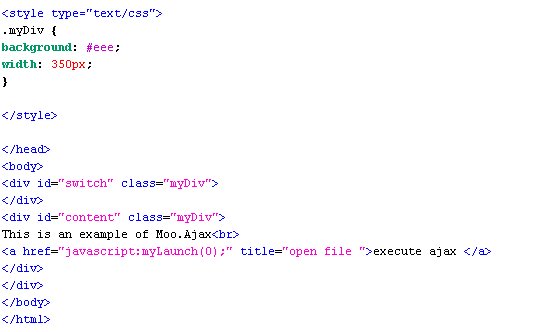
Now that we have the sandbox (mootools), We should add some images and some text. I've added three of my favorite images (01.jpg, 02.jpg, 03.pjg), with a lot of bogus data in some php files (01.php, 02.php, 03.php; Again, the php files simply echo out the data to act like an actual database or script). So let's set up the site!
 Javascript IDE
I spend a lot of time programming in javascript/html. I have a ton of crazy opinions (like loving Jedit all these years). I would like to take this time to endorse my new favorite web IDE: Aptana. If you haven't used it and are still using notepad, or dreamweaver to write your code, give it a try. It's based on eclipse and has a slew of online videos to teach you how to use it! A great feature is its javascript debugger. I just want to scream when I think about all the hours I spent using
alert("In the \"for loop\"");
when I could just use this debugger!
Also, when you start programming with aptana, you really feel like you're just flowing through the code. It's like some much of the busy work is DONE FOR YOU! I literally started laughing the first time I used it! Sigh, so beautiful...
The first of many
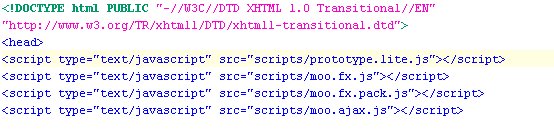
 Let's create the index file. In the past (with the previous versions of moo.fx and moo.ajax) you were forced to include four or more separate js files at the top of each html document. Since the advent of the consolidated mootools, though, all you need is one small little line for including all the files in the package (that you created at the begining, remember?).
Also, when you start programming with aptana, you really feel like you're just flowing through the code. It's like some much of the busy work is DONE FOR YOU! I literally started laughing the first time I used it! Sigh, so beautiful...
The first of many
 Let's create the index file. In the past (with the previous versions of moo.fx and moo.ajax) you were forced to include four or more separate js files at the top of each html document. Since the advent of the consolidated mootools, though, all you need is one small little line for including all the files in the package (that you created at the begining, remember?).
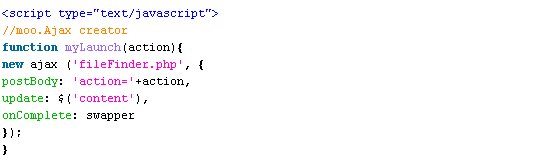
 So, let's make our ajax function. Some programmers like to have global ajax variables. This is ok with small applications, but I really prefer to have them all instantiated inside my functions. It keeps my code cleaner AND when working with multiple javascript file I don't have to worry about overwriting global variables (big one). So we write the getPictureData function.
 This function needs to grab the data and display it with ajax.
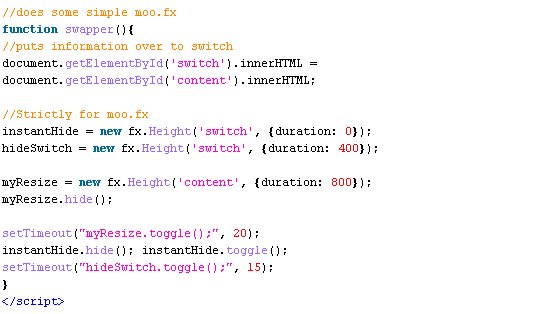
 That first line (instantHideInfo) shouldn't worry you. It's a function that will be written later. We just want to make sure that the info isn't displayed until we're ready.
new ajax (picInfo, {update: 'pictureInfo', onComplete: ajaxHandle}).request();
So, we make the ajax go to the address we send the function (picInfo), we have it update the div labeled "pictureInfo", then when the request is filled (the ajax response returns), we just ajaxHandle, (another function we haven't written yet).
Let me show you a little something AWESOME here, if you want, you can now do this:
new ajax (picInfo, {update: 'pictureInfo', onComplete: ajaxHandle, evalScripts: true}).request();
Now, I know what you're thinking, "What's that do?" Well, in the past it's been a real pain to get response text to run javascripts if you use ajax to snag it. This is because the browser never really runs the text. It's intercepted by ajax and placed in the browser (without it "feeling" it). I found a quick and dirty work around, but this makes everything so much nicer!
Since it's midnight now, I'm going to stop here for tonight and finish the tutorial tomorrow.
Again, happy new year!