Saturday, September 09, 2006

From the depths of the grave...

Now, I know what you're thinking...
"Where the heck has this guy been!??!?"
...Sigh... I've neglected yet another special someone. My online fanbase. ;-)

So, to my two readers (mom and dad), I send you this:
I installed Vista RC1! And it plays games (kinda) and it runs faster (kinda) and it's very user friendly (kinda) and AMD64's now have a reason to brag about their processors! (ok, that was just a lie).

Gaming
the reason we use windows to begin with!
Vista is amazing when it comes to gaming! If you can get your game installed (many games do install properly) they run just like in XP! For a while I was very worried that I would have to rebuy (ok, ok, I'd really just re-torrent) my favorite games to run on vista. It wasn't a worry that was misplaced, either. As the Apple community knows far too well, when the big "9 - X switch" happened, TONS of legacy software had to be ported over OR users were required to emulate OS9 in their knew OS. This was something they tended to not talk about when they were pushing their propaganda... now, on with my Microsoft propaganda... I mean, review.

Most of my games installed successfully on the RC1. I've installed Doom3, Halo, UT2004 (the CD version installs, but the dvd one freaks out, oddly), Steam (HL, HL2, CS), Soldat, and Worms Armageddon.

Interesting note: Windows currently keeps an index of all your files (essentially turning your entire computer into a database) to allow for instantaneous file searching. While you Apple users say that Microsoft stole that from you, please educate yourself on the Longhorn (vista's original codename) keynotes and you will find that this feature was clearly stated before 10.4 (the first version of OSX to have spotlight) features were announced. So, it would be pretty silly to say that.


A nice feature (or maybe slightly unnerving depending on how you feel) is that Vista checks for games that you install and places links of them in the "Games" smart folder. I then pulls information from the internet like the box art, the rating, and the developer website. Originally, I thought that it just did a quick search through the registry, but I copied the "Worms Armageddon" folder from my friend's computer and placed it on my machine. Almost immediately, vista placed the game in my Games folder with the art and rating!
You can turn off indexing, but I haven't noticed any serious CPU delays.

The only games I have yet to get working are Unreal 2 (UT2004 works, oddly) and Operation Flashpoint.

Thursday, March 16, 2006

Moo.Ajax

Moo.ajax Tutorial
Download Source Preview Example
Hi all, I know how everyone wants a moo.ajax tutorial and since I just finished redoing an old ajax website to use the moo libraries, I figure I can type it up really quick.

First of all, Ajax.
As you’ve heard a million times, ajax is simply the ability to communicate with your webserver without your user being required to wait for the response or be redirected (you can have dynamic page updates).

Moo.fx recently released a new library for making ajax calls very simply. The problem is that the documentation is lacking.

Since I was redoing an older ajax website, I went through the moo.ajax library code (it’s very small, took about 5 minutes) and discovered how they were making the calls.

This tutorial should simply explain how to use moo.ajax with php and also use it in correlation with the other moo.fx libraries for some pretty cool transitions for your ajax applications.

Starting off…
Let’s start with a simple application that will allow the user to replace a div with server information (much like the scoreboard example done over at deckerD).

(let me fir
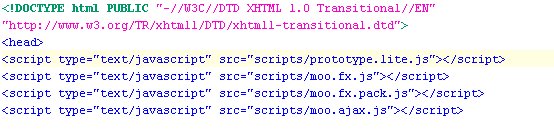
st off appologize for the images instead of code, blogger won't allow me to post code with tags like "head". You can download the complete source here).

HTML:

Let’s take some time to see what’s going on here.


First off, the moo.fx libraries are added (including moo.ajax).


Next, a simple function is made for executing the moo.ajax.
it’s first parameter is the server side script (fileFinder.php).

Next comes the options
, as with all the moo libraries.

  • postBody: the default method for moo.ajax is post, so postBody allows you to send arguments to your serverside script (we’ll see how to extract them later).
  • update: sends the server’s response to a specified div
  • onComplete: allows you to execute a function after the response has been received.


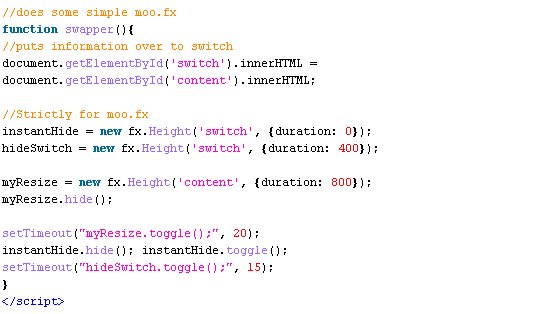
This snippet of code handles the transition after the ajax command is received. The first action is that the current div’s contents are copied over to the “switch” div (luckily this script is run before the update argument!).
Next, two instances of effects are created for switch (one with a time value of “0” for instant changing) and an instance is also created for the content div.
The content is initialized collapsed “myResize.hide();” and toggled to expand after 20milliseconds.

The switch div is first hidden, then toggled, both instantly (this is done to clear any previous state the div was in before, also to reset the size since the content copied over may be larger than the previous data). Then the switch is collapsed after 15milliseconds (hopefully along with the content layer for a neat transition).


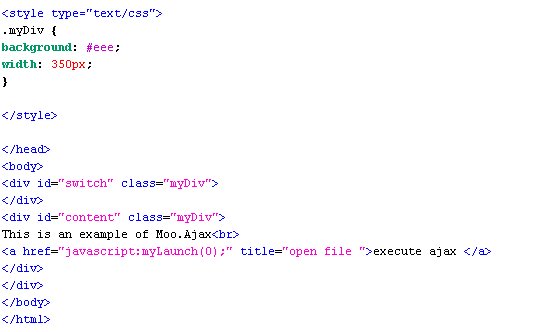
In the body there are the two divs and a link inside “content” that runs the moo.ajax script on interaction.


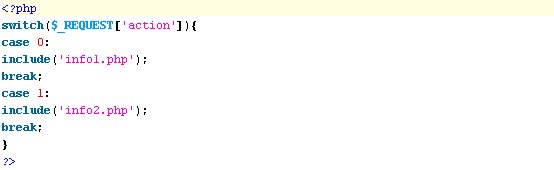
PHP (fileFinder.php):


This php file just processes the arguments sent to it ($_REQUEST[‘action’]) and goes through the switch loading the other php files (identical to the scoreboard example).


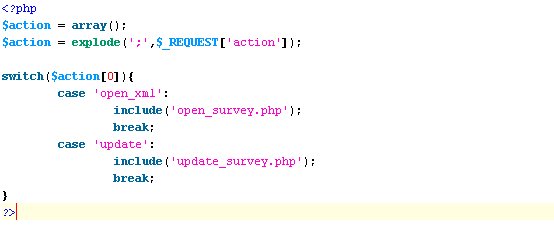
TIP: If, though you want(or need) to send multiple arguments, separate them with some character and “explode” them into an array (example below).


PHP (info1.php):


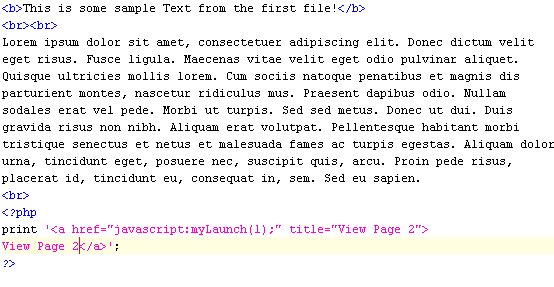
This php file just prints out some html text, and also adds a link for going to the next file.

NOTE: In all honesty, the link doesn't have to be written in php. I did that so that I could easily break it apart for adding dynamic links (aka: I could use the multi-argument example above to make the link go somewhere else from the first command (control the post-flow of content).

See it all in action
Now that all the code is out on the table, let’s see it working!
Click Here

Some other tricks:
A new problem I’ve encountered since I started working in ajax is that I am beginning to miss my “onload” commands I knew and loved so much. You can only place an “onload” in three situations,
  1. iframes
  2. Body
  3. Images
I found a quick (and dirty) way of getting my onloads back for ajax. Simply place an image in your code with a height and width of “0px”. While this looks really nasty in the code, it is unseen by the users and allows you to execute functions that would take time to program around (simply good for people who are upgrading their websites to ajax).
Note: if you know any other way to do this that isn’t as dirty, please comment!, lol.

Well, I hope that helps yall.
~follower

Wednesday, December 21, 2005

Adobe Did It Right!

Flash Dance
Finally! Adobe has done what Macromedia never would have dreamed of!!
The newest version of Flash (Flash 8) has some of the best new features I never would have thought of adding AND (very important) the greatest features that were left behind in previous builds (famed v.5)!

Vector to Object
Why did Macromedia never think of this? For those of you who programmed in flash back in version MX and previous, you know what a pain it has always been to take an object and turn it back into a vector. For those who have no clue what I'm taking about, let me give you a quick idea.
Adobe Flash (once Macromedia Flash) is world renowned for being the most powerful web-vector-motion software available.

What is vector-motion?

You may ask... well, in the world of computing, there are really two types of video. Prerendered and Realtime. Prerendered video has been around for a long time, in fact, it could easily be equated to your TV. Someone far away makes a great show for you to watch and transmits that show to your Television.
Nice, huh?
So what's bad with that? Nothing. In fact, it's great; if not the best!
The problem arises when you can't send a video to someone for some reason (say, bandwidth limitations).
There are a number of solutions, Flash just happens to be one of those solutions. Flash allows you to send a video and have the computer create it using the flash player (very similar to the java runtime environment (jre) for java apps). You (basically) send the player compiled code (swf file) and it turns it into bouncing balls and flying text.
These vector graphics (another option is to compress your video, which is like a hybrid where your computer recodes the partially decomposed file (hopefully much smaller into its original state in realtime)) are just mathematical equations that form whatever shape you plan to make. If you know anything about computer images, you know the difference between a JPEG and Clipart. Clipart is generally made from vector graphics. Because Vectors are logical equations, you can resize them without distortion (Unlike a JPEG). Sadly, unlike a JPEG, a lot of detail is often left out for simplicity or filesize.
In flash, you can have both (which is good!). But for adding actions, you have to have objects (since vectors only hold shape, color and size).
Fine, so add actions to objects that are larger, use vectors for everything else. Well, with the new version of flash, you can "test" a vector as an object (all that text, just to say, "Yay!")

Script Assist

Finally back in flash is the wonderful "script assist". This is similar to the "simple mode" known in Flash v.3-5. For many people, this is the best way to program. With a language like actionScript, it's nice to know all the keywords and what types they take. Since Flash has to double as a design environment and IDE, it's best if the IDE is good (and now, it is!). I kept using Flash 5 when 6 came out simply because I hated the new actionScript editor. I could crank out code 10x faster with the older version, and there weren't many new commands. Macromedia really botched it up with Flash 6 and MX. I was pretty scared about Adobe buying out Macromedia, but now I know that they have the good hands (and deep pockets) that will take care of the developers.

Adobe Photoshop Now
Yes, We all love Photoshop. We love the toolbars, the blend modes... everything except for the price tag! Now Flash can do blend modes like photoshop. REALTIME!
Woohoo! Everybody do the bender!
This is a feature that is going to really start showing up fast (like, on my next project). Before, flash developers (like myself) had to load up photoshop, create the images, export them, import them and then work with the stale stagnant images in flash. But now, we can do a lot more than size and alpha transparency! This is a beautiful idea that only Adobe could bring to the table (since they own the patents on the photoshop blending modes).

Adobe Premiere Now
Heh, You know that Adobe had to spruce up the Flash video import features.
On2 VP6 is the codec of choice with the new player, and I have to say... the samples really show off what it can do (Check out the split-screen version at the bottom)!!
Also, you can apply alpha-transparencies to the video feeds realtime. :-D
Oh man, I know one little programmer who is going to be having a lot of fun soon!
;-)
Ah, yes. And this link is... Wow. If I were Apple Quicktime, I would start paying attention to Adobe and On2 VP6! I can see this being very easy to use on trailer websites... and since Flash is a web application with no real personal media player, it's nearly impossible to rip or distribute.

On2 VP6 can even stream full screen movies to you REALTIME.


In case you were wondering, "Realtime" is the "word of the day"

AHHHHHHHHHH!!!!
;-)